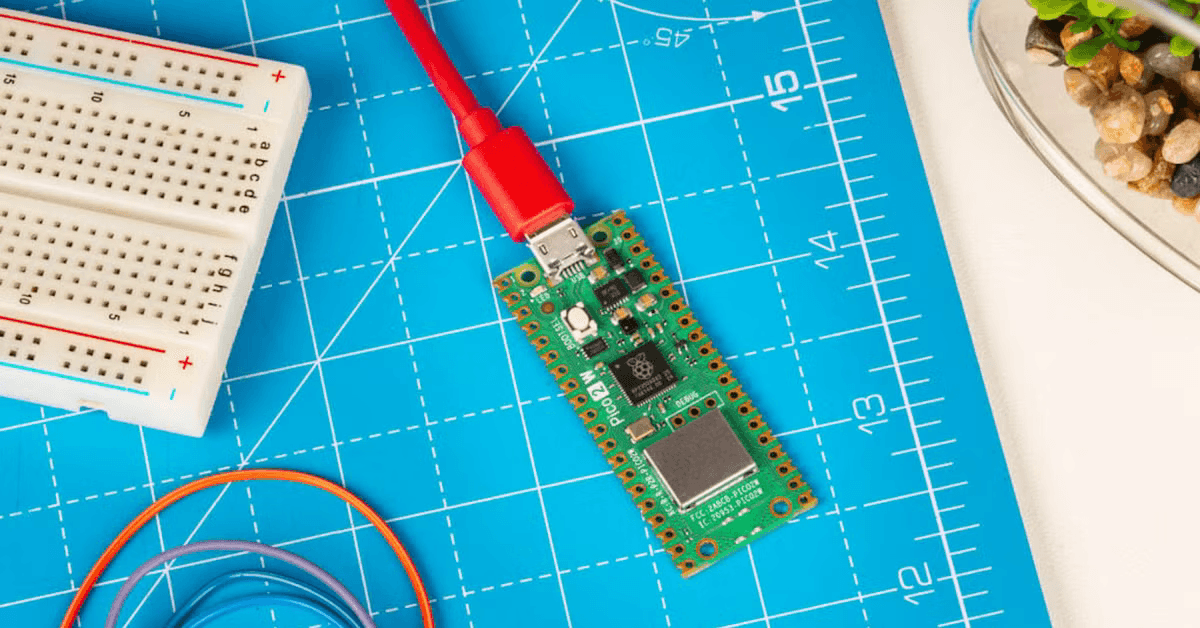
Pico Router
Creator and maintainer of a deterministic pathfinding firmware for embedded hardware. Made for predictable performance and minimal memory overhead on microcontrollers without requiring wireless connectivity.
TL;DR
Pico Router is an open-source, deterministic C++17 pathfinding engine designed for memory-constrained embedded systems like the Raspberry Pi Pico. Originating from a GSoC project, it provides an A* routing library that runs within 64–128 KB of SRAM using compact Compressed Sparse Row graph representations.
Table of Contents
Background
Pico Router grew out of my preparations for GSoC 2026. During this period I spent several months exploring routing engines and the OpenStreetMap ecosystem. After being rejected I thought "What's stopping me from making my own FOSS project?". Knowing I wanted to maintain my routing/GIS trajectory while also interested in embedded systems I came up with the idea for Pico Router.
Originally setting out to build an exhaustive routing firmware ecosystem, I later scaled back my ambitions slightly by first perfecting the routing core (read Pico Router Changes Directions for more details). This effectively turned Pico Router into an embedded C++ routing library.
Today, I see Pico Router as both an educational project and a genuinely useful piece of software. The goal is to build something that can stand on its own as a reusable routing library while continuing to explore what is possible on constrained hardware.
Pico Router in a Nutshell
As it stands, Pico Router is a C++ routing engine library which offers deterministic and configurable memory usage. It offers optimized pathfinding capabilities using a compact internal graph representation. While it is mainly aimed at the Raspberry Pi Pico lineup (as the name suggests), I'm planning support for a myriad of other boards as well.
The bulk of the library is abstracted behind a relatively simple interface.
Path calculatePath(
  const Graph& graph,
  uint32_t start_node,
  uint32_t goal_node
)
Here the returned Path struct is simply an array nodes found to be the optimal path.
The Algorithm
While Pico Router will most likely feature a handful of different pathfinding algorithms in the future, it was initially built around A*. My focus on disaster relief applications made traversable road networks a natural starting point. Since these usually form sparse directed graphs, A* seemed like a good algorithm to build on.
The positional nature of road network nodes gave me an easy starting point for the heuristic function, namely the Euclidean distance function. Having this computation encapsulated gave me a great surface to experiment on using A/B methods (see Benchmarking and Profiling).
Speaking of encapsulation, early on I made the decision to abstract common graph operations behind an interface. This allowed the pathfinding algorithm to stay mostly separate from the underlying graph representation thereby giving me even more room to play around with different parts of the workload without disturbing others.
Graph member functionsgetNeighbors();
getCoordinates();
getNodeCount();
Why C++?
Firstly, my choices were quickly limited to C and C++ due to their native compatibility with the official Raspberry Pi Pico SDK. The decision to go with C++ over C came down to the fact that C++ offered the right abstraction model I was looking for. Needless to say, I'm also more familiar with routing systems in C++ than C after my work with/on Valhalla.
Of course, I knew from the very start I'd have to limit myself to only a subset of language features given the constrained and delicate environment (no dynamic heap allocations and such). This need for stability and reliability was also why I went with C++17 specifically. The Pico SDK uses arm-none-eabi-gcc as its main ARM compiler, which at this point works fantastically with C++17. Moreover, missing some of the newest features has some educational perks. Lacking std::span (introduced in C++20) allowed me to roll my own contiguous pointer EdgeRange to return a node's connected neighbors.
Designing a Router for the Pico
Choosing the Pi Pico as my hardware starting point was a great choice in retrospect. It offered me the opportunity to feel the very real effects of making something run on a constrained 32-bit system while still having access to the entire Pico SDK toolchain. This allowed me to focus more of my time on the code and less on the build configuration.
Up until now I've been a bit ambigious with singling out either the Pico 1 or 2. The truth of the matter is that I'm taking both into account. This also has to do with some situational limitations I'm dealing with. Namely, I bought, and therefore have physical access to, the Pi Pico 2 (RP2350). However, for the hardware simulation the only somewhat complete platform description is for the Pi Pico (RP2040). Point being, my mindset was "make it run on the RP2040, see what it's capable of on the RP2350". Notably, with offline capabilities in mind, I opted for the regular boards as opposed to the W boards featuring wireless networking capabilities.
| Specs | RP2040 | RP2350 |
|---|---|---|
| CPU | Dual-core Cortex-M0+ | Dual-core Cortex-M33 or Hazard3 RISC-V |
| Clock | 133 MHz | 150 MHz |
| SRAM | 264 KB | 520 KB |
| External flash | Up to 16 MB | Up to 32 MB |
The Problem and Constraints
From the very start I saw memory usage as a kind of promise to the user. When using Pico Router you will know exactly how much RAM will be dedicated to routing. Keeping this in mind, let's look at the constraints we're working with. Both microcontrollers are ARM dual-core systems with an average of ~300 KB of SRAM. Importantly, both systems offer a couple megabytes of external flash memory. This will be important for graph storage and loading later on.
Naturally, I can't expect Pico Router to have access to all the memory all the time. I therefore set myself a baseline of approximately 64 to 128 KB of runtime memory usage. That would mean that Pico Router router would use about 35% of the total memory budget. To be very honest, these numbers are not set in stone nor do they come from an authoritative source. Still, I think having a baseline in mind will pay dividends once other people actually try using Pico Router for their own applications
I would like to make it clear that this memory constraint poses a serious challenge. Maybe the best way to understand how little memory Pico Router has available let's compare it with some traditional open-source server routing engines. Please note that the chart below uses a logarithmic scale. Were you to use a linear scale you'd hardly be able to see Pico Router's usage.
Besides spatial metrics, there are of course also timing metrics. Nevertheless, at this moment in time I don't enforce strict performance limits on myself as long as resource usage is under control. This does not mean I don't care about performance at all. I have my benchmarking suite to make sure I don't unknowingly impose heavy performance penalties on myself.
The Graph Representation
Now that you understand the inherent challenges with respect to the available resource budget, let's take a look at what Pico Router's internal graph looks like. As of v0.2.0 I've taken three-ish attempts at creating the graph data structure with each iteration improving on the previous.
The very first attempt (version 0) was by far the simplest with the only goal being to make the A* algorithm work in any form. It was composed of three separate structs (Graph, Edge, Node) containing all the graph's state. The Node struct was notably large containing F-score, G-score, XY coordinates, and heuristic fields. On top of that, it had both an edge_count property and a hardcoded 4-index Edge array as member data (I can not remember why it had this but I assume it was meant to be temporary xD).
The second try (version 1) maintained the same rough outline by keeping the three structs while changing their relations. Many of the Node fields were moved to the pathfind::Astar class and Graph adopted a fixed-size parallel array structure. What's perhaps most interesting is that I tried to save significant space by making the graph traversable as a linked list. Node contains first_edge_index which points at the its first edge. Then each consecutive Edge will point to the next edge in line until reaching a 'no next edge' sentinel value.
The third, and for now final, go at the design (version 2) increased slightly in size in exchange for a dramatic performance increase. Only after first setting up my benchmarks I started pondering the cache friendliness of my data structures. The main problem was that my linked list approach exacerbated many of the pathfinding memory access unpredictabilities found in these kinds of systems. This prompted me to give the graph a compressed sparse row adjacent design to allow for neighboring edges to be stored contiguously in memory. This is also where I introduced the graph interface, which is why the Node coordinates are now stored in a separate Coords struct. To see the performance boost I mention earlier check out Benchmarking and Profiling below.
struct Graph {
  uint32_t graph_id;
};

struct Edge {
  uint32_t edge_id;
  uint16_t to;
  uint16_t cost;
};

struct Node {
  int32_t node_id;
  int32_t x, y;
  int32_t g, h, f;
  Edge edges[4];
  uint8_t edge_count;
};
struct Edge {
  uint16_t target;
  uint16_t cost;
  uint32_t next_edge_index;
};

struct Node {
  int32_t x = 0;
  int32_t y = 0;
  uint32_t first_edge_index = 0;
};

struct Graph {
  std::array<Node, MAX_NODES> nodes{};
  std::array<Edge, MAX_EDGES> edges{};
};
struct Edge {
  uint32_t target;
  uint32_t cost;
};

struct Coords {
  int32_t x;
  int32_t y;
};

struct Node {
  Coords coordinates;
  uint32_t edge_offset;
  uint32_t edge_count;
};

struct Graph {
  std::array<Node, MAX_NODES> nodes{};
  std::array<Edge, MAX_EDGES> edges{};
};
Keeping Memory Predictable
While I already briefly touched upon the fixed-arrays which make up the graph, I'd like to delve slightly deeper into my efforts to make memory deterministic. The biggest bulk of memory usage besides the graph itself is the algorithm's runtime state (think of the priority queue, open/closed lists, etc.). Virtually all of this data once again consists of fixed-sized arrays used for different purposes. "Arrays of what?" I hear you ask. The answer is that they all contain node ID's, which are just type alias of a uint32_t. Because they all essentially serve as pointers to other node indices, they can be unified under the same type. Also, because they're just indices they'll never be negative allowing me to increase the available range using unsigned ints instead of signed ints.
node_id to uint16_t or maybe even uint8_t for tiny graphs, saving the user a boatload of space.The next question you might ask is "Then how many items does each array have?". It is once again of great convenience that every array describes one aspect of the same abstract object. We just have to know what the maximum size of the graph is by the quantity of its nodes and make each array that size. While it would probably be good to at some point have another compile time evaluation of the graph size (assuming the graph doesn't change during runtime), at this point the user manually enters the max amount of nodes and edges they require via a config.json. This config file gets compiled by a tiny Python script into a C++ header file and is subsequently included and used in the build as the size of the parallel arrays.
In order to get some insight into how much memory is actually being used, I took advantage of this determinism. Using a compiled C++ script that does nothing but read and pretty print the sizes of all these runtime objects including their collective sum. What's more is that using arm-none-eabi-gcc allows me to track the static memory usage by running arm-none-eabi-size on the compiled ELF path. This then also gets printed alongside the other objects memory numbers.
MAX_NODES = 1000, MAX_EDGES = 4000, and MAX_PATH_LENGTH = 100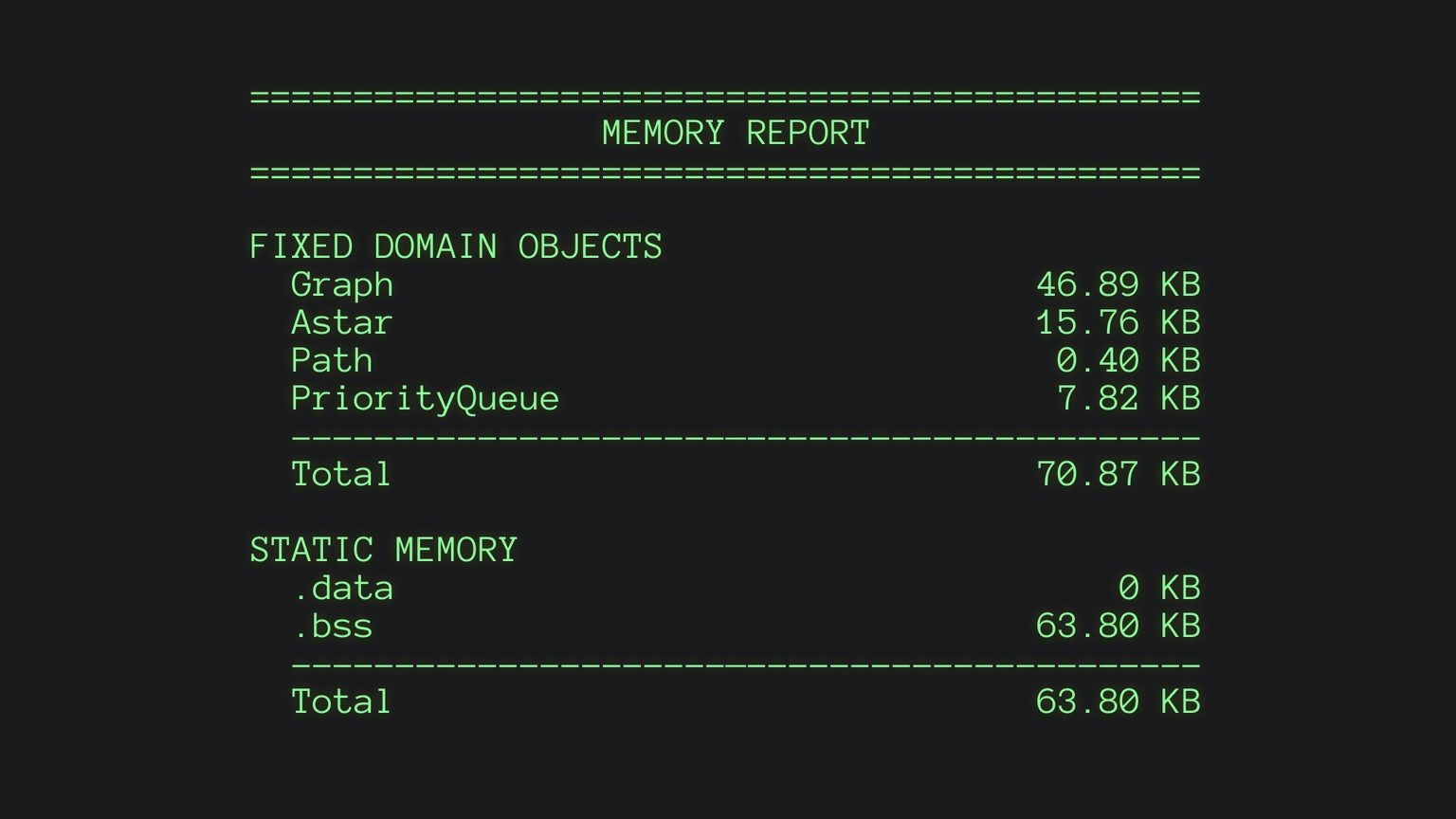
Making the First Version Work
Now let's talk about what it actually took to get the first running version on the Pi Pico. The first big hurdle came in the form of the dev environment setup. I knew from the very start that I didn't want to task potential users and contributors with installing a laundry list of versioned dependencies to get started. This naturally led me to the creation of a devcontainer containing the toolchain.
I subsequently worked in this environment until fulfilling handful of checkboxes:
- Make a graph, any graph that is, as long as its compatible with the algorithm;
- Get a functional version of an
Astarclass; - Make the
mainloop execute a path traversal demo on static graph fixture; - Print a pretty banner and some basic
std::chronobenchmarks from the demo run.
So far, so good. Trying to actually move the code from the devcontainer to the Pico 2 without creating a giant mess prompted me to create platform directory, allowing me to separate the host and Pico hardware abstractions. I have to say that the Pico SDK really helped out here by offering headerfiles with excellent APIs for writing over USB UART and accessing the BOOTSEL button's state.
Finally, I hooked up the Pico 2 via micro-USB, flashed the demo onto it, and opened a PuTTY window and..... nothing. Turns out, debugging is pretty tough without any kind of error logging. Luckily, I could identify the problem quite quickly, being that I set the MAX_NODES and MAX_EDGES constants way too high causing the program to allocate out-of-bounds memory and instantly killing the Pico.
With that fixed, I was able succesfully run the demo you see here below:
Benchmarking and Profiling
The first appearance of any micro-benchmarking in the project were in the aforementioned version 0 demo. For this, I wrote an very rudimentary timer using std::chrono::steady_clock to loop over the main demo traversal several thousand times and return the average wall clock time.
While this was a solid start, I needed to get more insight into caching and scaling behavior. This led to me making a separate Google Benchmark target which would run on the host hardware. Using ifdef blocks in the A* path I could additionally measure custom metrics like the amount of node discovered and edges expanded. Even more interesting is how I setup a dynamic graph fixture generator to be able to test the performance of the program on various graph sizes of various densities. Here, the Mersenne Twister pseudo-random generator (std::mt19937) allowed me to make generations random yet deterministic using a seed int.
Of course, these benches are not absolute measures of performance, they don't even run on the target hardware. They do however help measuring relative improvements experimenting with various optimizations.
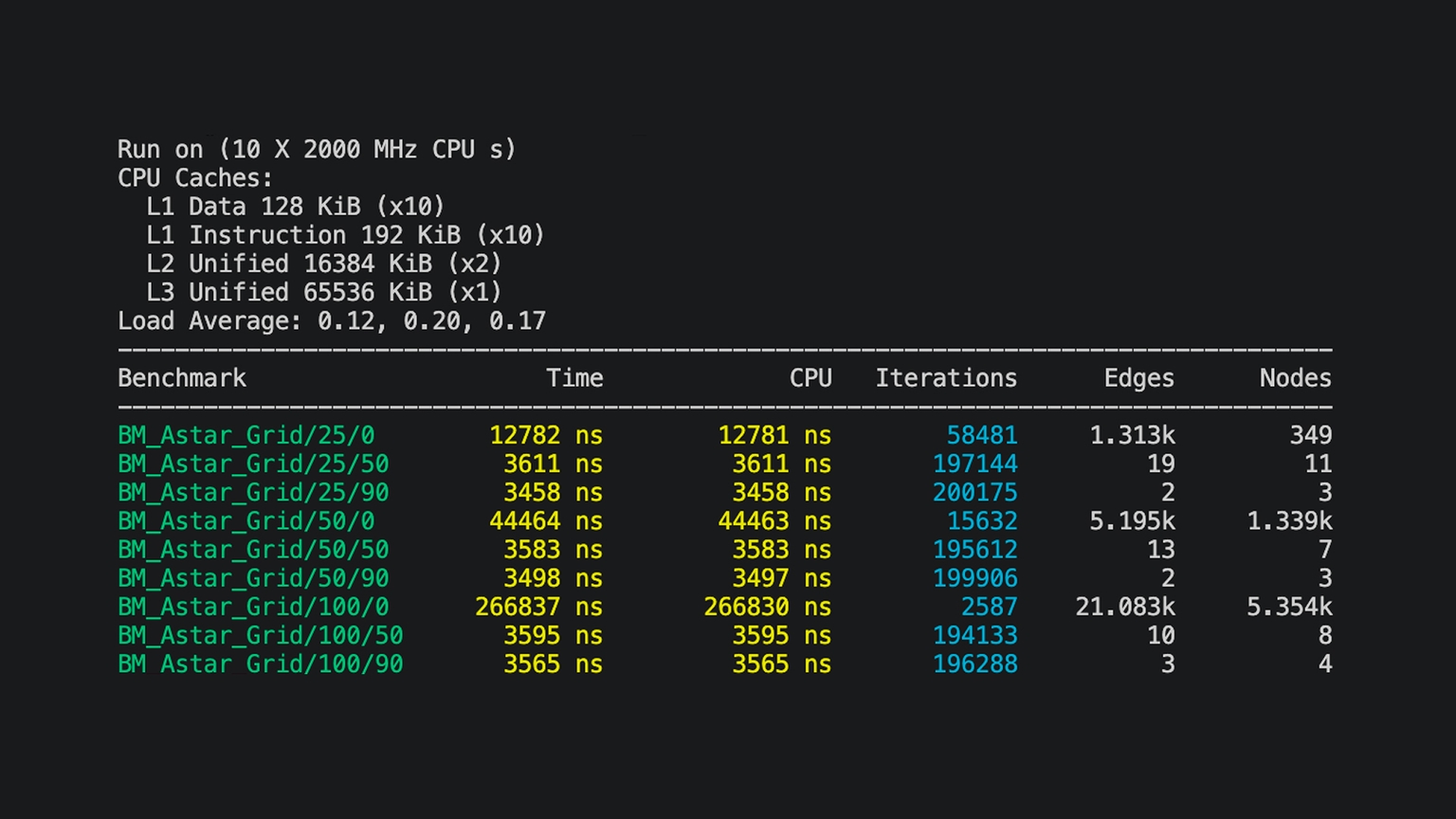
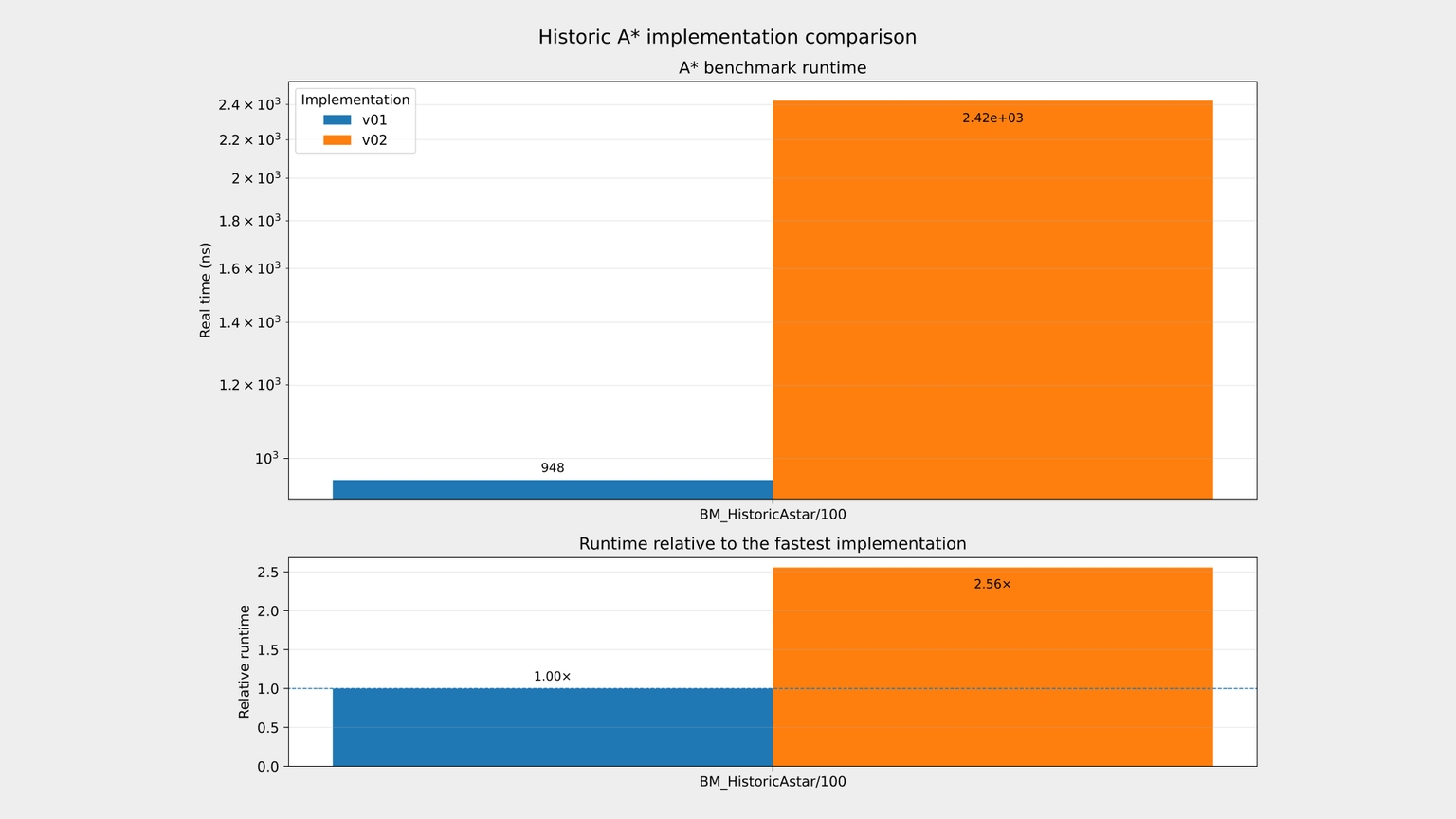
BM_Astar_Grid/[x]/[y], x denotes the grid dimension, i.e. the number of nodes along each dimension. y stands for the obstacle density. The fact that the expanded nodes and edges get shorter as the density grows means the algorithm runs out of possible paths and returns an incomplete path.To measure how different iterations of the graph and algorithm stack up against each other I set up historical benchmarking. In short, I keep a checkout of each significant version in benchmarks/historic/v* subdirectories. Than a Python bench runner executes them and prints a neat matplotlib diagram comparing the performances. See below how the move from linked-list traversal to the CSR-like graph improved performance more than 200%.
What's Left?
My broader ambitions are to continue growing and expanding Pico Router indefinitely. I've found it to be the perfect playground to test ideas and deepen my embedded systems intuitions. What's nice about Pico Router is that it occupies a unique space between open source GIS and embedded system technologies. Once the project hits the quality threshold I'm comfortable with (marked with a v1.0.0 release), I'd love to formally introduce it to the wider community. As things stand, I hope for that to happen somewhere during start to mid 2027.
I'll take things one step at a time for now, but I'd ideally like to move toward a native Zephyr RTOS integration at some point. Pico Router being somewhat of a computational black box would make for a good Zephyr thread IMO.
Using arbitrary OSM data
Moving toward an actual community introduction of the project, accesibility is top of mind for me. Making Pico Router useful as a library to anyone outside of the project would require a painless way for people to inject their own custom graphs. An easy start would definitely be integrating OSM as a data source, not least because this all started with my involvement with OSM routing engines. Needless to say, even the tiniest fully featured OSM map is completely off the table for the Pico in terms of graph size. Having already though of this, I started work on an internal Python-based CLI tool called osm-convert which would allow users to convert arbitrary geo bounding boxes into Pico Router graphs. However, I have temporarily paused work on that to focus on the routing internals. All in all, this is for sure something that is left to be continued.
Flash Storage and Tile Caching
A separate yet equally important hurdle to overcome is the storage and retrieval of large-sized graphs. For my current purposes I've been able to get away stack-allocations only, which is obviously not viable for production. Considering the speed of SRAM, I'd consider placing medium sized graphs on the heap, large graphs in flash memory, and giant graphs in persistent SD storage. Sounds simple in principle but a smooth execution would be tricky (although Zephyr unified HAL APIs would make portability much easier).
Perhaps easiest of all is the allocation of medium-sized graphs on the heap. I'm thinking returning a simple std::unique_ptr will only fragment the graph into a few chunks and it will nicely clean up after itself of course.
Large graphs in Pico's External XIP flash memory would sadly no longer enjoy single clock cycle SRAM loads. Instead, they would have to pass through a 2-way set-associative cache first. To minimize the performance penalty involved here I'd like to implement cacheline-sized graph tiles. Those tiles would for now be arranged in a flat array, although a hierarchical setup would eventually be very interesting as well. Then, to encourage cache hits, the tiles are rearranged either at compile time or during bootup using Morton's Z-order curve to increase the likelhood of cache hits by placing geographically near coordinates closer together in memory.
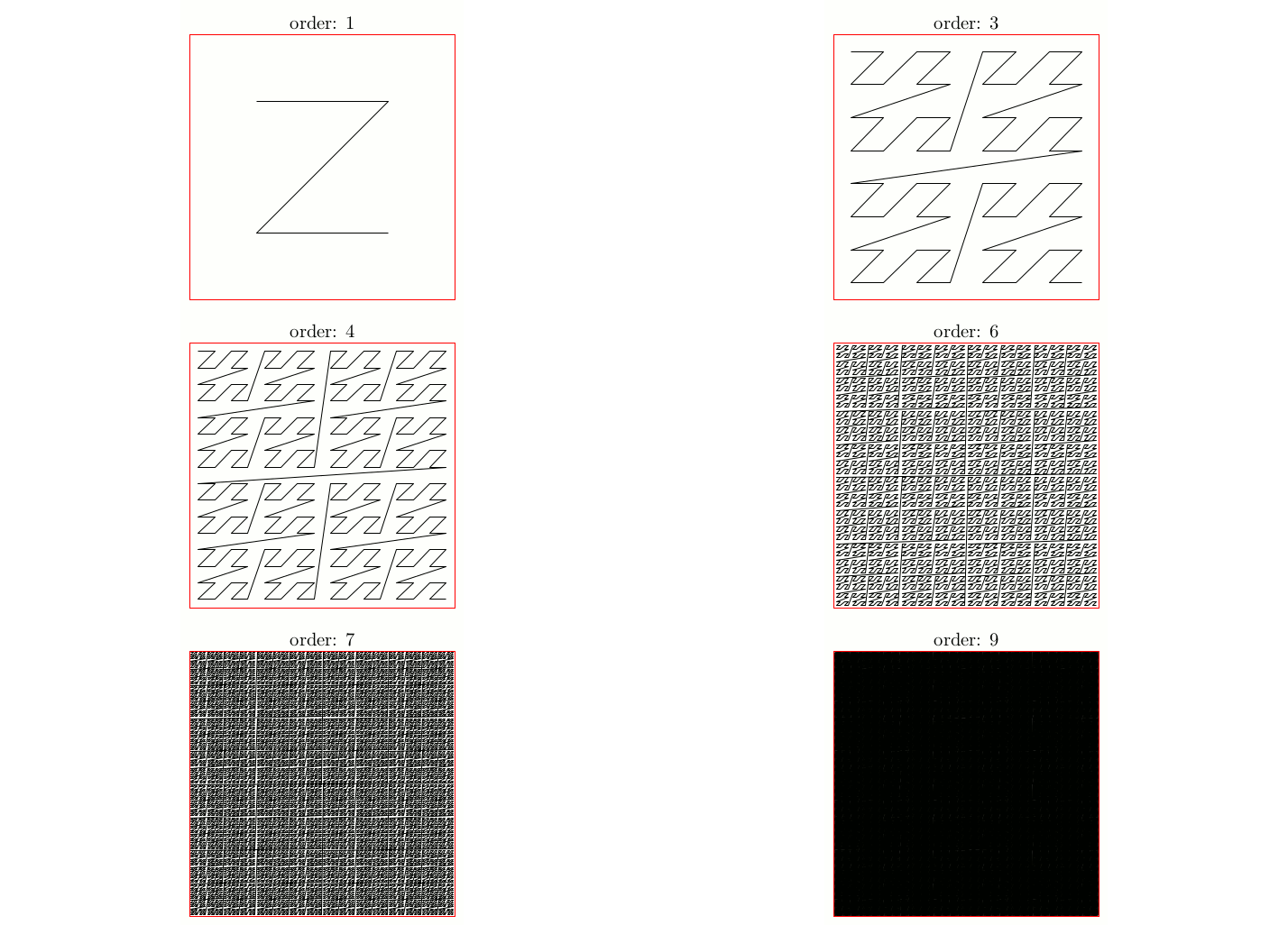
Lastly, loading a giant graph from SD storage would have to be done very carefully to not keep the CPU waiting for hundreds of cycles. Perhaps at that point I could subdivide the graph once more in even larger chunks and implement a thin layer of software-based caching. For now that's just food for thought though.
Focal Grid
Client project where I was tasked with building a full-stack energy grid visualization platform by ingesting open municipality data into a PostGIS databse.
Valhalla
Contributor to Valhalla, a high-performance routing engine built on OpenStreetMap data. My work focused on Python interoperability, OpenLR support, developer experience, and infrastructure improvements.